Direct bank account connection
The direct connection allows rAInty to automatically import bank transactions through a secure authorisation flow.
Once the connection is complete, you do not need to upload any files manually: rAInty syncs transactions from the banking provider and makes them available inside the platform.
Before you start
Make sure you have your online banking credentials to hand. The process will take you to your bank's secure page to complete the authorisation.
Steps
- Open the sidebar and go to the Banking section.
- Click the Add account button.
- Choose the Direct connection option.
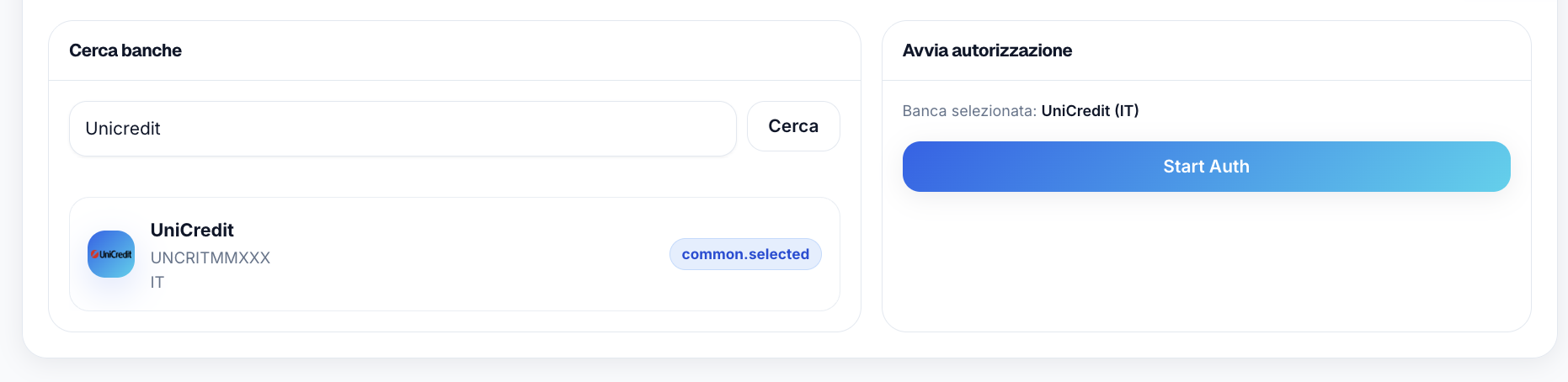
- In the search field, enter the country name or the bank name.
- Click Search.
- Select the correct bank from the list.
- Click Start Auth to begin the authorisation process.
- rAInty will show a link to continue the authorisation flow.
- Open the link and follow the login and authorisation steps shown by your bank.
From this point you are leaving rAInty and entering your bank's secure flow. The screens you see will vary from bank to bank.
After authorisation
When your bank confirms the connection, the account will appear in rAInty.
You can then proceed with syncing transactions.
Syncing transactions
Transactions are normally synced once a day automatically.
If you want to force a manual sync, open the bank account and click Sync transactions.
After the sync, transactions are visible in the transaction list and can be matched to rent instalments, expenses, utility bills and other items.
Authorisation expiry
Bank authorisations can expire over time.
When that happens, the account may remain visible in rAInty but new transactions might not be imported until the authorisation is renewed. In that case, repeat the authorisation process from the bank account page.
For the direct account connection, rAInty uses Enable Banking, an open banking infrastructure provider that enables access to bank data via APIs compliant with the PSD2 regulation.
During the authorisation process, access is confirmed through your bank's secure flow. rAInty will not ask you to enter your banking password directly on the platform.
The connection is used to read authorised account movements and data — not to move money. Account information service providers are authorised to view bank account information but cannot initiate payments.
Before continuing, always verify that the authorisation page genuinely belongs to your bank. If something does not seem right, stop the process and contact support before proceeding.
Frequently asked questions
How often are transactions synced?
Normally once a day. You can also trigger a manual sync at any time using the Sync transactions button on the account page.
What should I do if I cannot find my bank in the list?
Try searching by country or by name. If the bank does not appear, it is probably not yet supported by the open banking provider. In that case you can use the manual bank account setup.
Can rAInty move money from my account?
No. The connection is configured for information access only: reading authorised account movements and data. It is not used to initiate payments or move money.
What happens if the authorisation expires?
The account remains in rAInty but automatic syncing stops. You need to renew the authorisation from the bank account page by repeating the connection flow.